
Fortunately, you are not required to have a showroom-quality, flawless clean room to reduce dust accumulation in order to prevent excessive build-up. For many homes, the easiest way to do this is an easy plan of action: minimize dust sources, improve where the PC is located, ensure case openings allow for air movement through filter at some point during airflow, and create a cleaning routine that you will continue with regularly. This method generally provides savings over simply replacing fans, cases, or other components every time because the set-up gives the illusion of dirtiness.
TL;DR
- EPA lists outdoor air, cooking, candles, pets, printers, and even cleaning activity itself as common sources of indoor particles, so the dust on your PC often starts in the room, not in the case.
- PCs get dirtier faster when they sit on carpet, near HVAC vents, beside windows, or in rooms with pets, fabric chairs, and heavy foot traffic.
- Use the DUST Score in this article to find your main problem before you spend money.
- The highest-value fixes are usually cheap: raise the tower off the floor, clean or add intake filters, manage room dust, and check HVAC filters monthly.
- Portable air cleaners can help, but EPA treats them as a supplement to source control and ventilation, not a substitute for fixing the room or the case layout.
Why some PC setups get filthy faster than others
Because dust is made up of many things (outside dirt, hair/fibers/dander/fried and/or cleaned stuff, food spills, etc.) when there are activities occurring that will get it back into the air, such as walking or vacuum cleaning, there is a lot of dust to continuously draw in to be filtered by your EPA or while it is working. Dust is not only drawn into a EPA by using the built-in fans and then blown back out of the exhaust vent, but dust also gets collected inside of the EPA around the air intake or exhaust vents. Dust builds up there and reduces the amount of airflow to the cooling fans and makes them work harder, thus increasing the noise of the system as a result.
- Floor placement matters more than many people think. A tower on carpet or tucked under a desk is closer to the heaviest layer of disturbed dust, lint, and pet hair.
- Soft surfaces shed. Rugs, upholstered chairs, blankets, curtains, and even a fabric mouse pad add fibers to the air around the desk.
- Airflow in the room can beat airflow in the case. A supply vent blowing toward the desk, a nearby window, or a door to a busy hallway can keep feeding particles to the setup.
- Some “dust” is really soot. If you burn candles, incense, or smoke near the desk, the residue can be darker, stickier, and harder to wipe off.
- Pets are efficient dust multipliers. Hair, dander, and tracked-in dirt raise the baseline, especially in bedrooms and offices where animals nap nearby.
- A clean room with a badly managed case can still get dirty fast. That happens when the case draws air through open gaps instead of easy-to-clean filtered intakes.
Use the DUST Score before you buy anything
To help with your evaluation, here’s a simple tool – creating a score card for each of these two components (0-2) will identify those few or many issues and find those two contributing the greatest amount of harm!
| Factor | 0 points | 1 point | 2 points |
|---|---|---|---|
| D = Distance from floor | Tower is on desk, stand, or shelf | Tower is on a hard floor | Tower is on carpet or very close to the floor |
| U = Upholstery and pets | Hard-floor room, minimal fabric, no pets | One major fabric source or one pet | Carpet plus fabric seating and/or shedding pets |
| S = Source proximity | Away from vent, window, kitchen, and traffic path | Near one source | Near two or more sources |
| T = Through-filter airflow | All main intakes filtered and easy to clean | Some filtered intake, some open gaps | Missing, clogged, or poorly fitted filters |
| A = Activity level | Low foot traffic, door usually closed | Moderate traffic | Busy room, frequent movement, frequent door opening |
| Score meaning | 0 to 3: low dust pressure | 4 to 6: moderate dust pressure | 7 to 10: high dust pressure; fix layout first |
If your score is 7 or above, then you should not be purchasing an expensive new case or high-quality fans. The most likely cause of your issue will be how your room is set up and where your computer is located. If your score is 4-6, then typically, modest upgrades will work well. If your score is equal to or less than 3 (and the PC continues to clog quickly), the likely cause of your problem will be a very specific source that you didn’t think of, such as: a supply vent, candle wax residue, printer, or an intake vent with a poor filter.
The cheapest fixes usually produce the biggest improvement
This is where the personal finance angle becomes relevant. We tend to buy fans, a new case, or a big air purifier before dealing with floor placement or the room source. In the average US home office, the highest return $/ft2 moves are typically inexpensive and simple.
| Problem | First fix | Typical one-time cost | Ongoing cost | Expected payoff |
|---|---|---|---|---|
| Tower sits on carpet | Add a stand or move the PC onto the desk | $20 to $40 | $0 | Usually the best first move |
| Visible dust on front mesh or intake fans | Clean existing filters or add magnetic filters where the case allows | $10 to $30 | Low | Cuts how much dirt reaches the interior |
| Room stays dusty even after cleaning the PC | Vacuum fabric surfaces and damp-dust hard surfaces weekly | $10 to $25 for supplies if you already own a vacuum | Low | Often reduces desk dust more than internal PC cleaning |
| Central HVAC seems to spread dust | Check filter monthly; ENERGY STAR says change it at least every 3 months | $10 to $30 per filter | Moderate | Can improve both dust and airflow in the home |
| High-particle room from pets, traffic, or outdoor air | Add a correctly sized portable air cleaner | $80 to $200+ | Filter replacements | Helpful, but best after source and placement fixes |
A realistic household example with numbers
Take for example a reader’s setup. The user’s mid-tower gaming PC is located in the spare bedroom at a size of 10 feet by 12 feet. The mid-tower gaming computer with the supply vent is located 3 feet away from the mid-tower gaming computer (supply vent). The user has a dog (1) and an office chair (fabric) and the window will be open sometimes (on most evenings). The front filter of the mid-tower gaming computer looks gray in less than a week’s time to change it. The user wipes down (clean) his desk every Saturday, resulting in very high levels of dust build up. The overall score for this room (DUST Score) is 8, this would be classified as “HIGH DUST PRESSURE”.
Instead of replacing the case, the reader spends about $25 on a simple tower stand, $18 on magnetic filter material for an unfiltered side intake, $14 on a fresh HVAC filter, and $12 on microfiber cloths and a small cleaning brush. Total: about $69. If that routine stretches visible filter buildup from 7 days to around 21 days and cuts deep internal cleaning from every two months to once a quarter, that is a good outcome. If the room still runs dusty after that, an EPA-style portable air cleaner sized to the room becomes the next step, not the first one.
How to set up the room and the PC so dust builds slower
- Begin by lifting the PC up. If your computer has a desktop tower, try to move it off the carpet and out of the lowest dust zone. A stand will typically work; however, a dedicated desk shelf is ideal if you have the necessary space.
- Monitor the airflow of the room. When the HVAC is turned on, locate yourself by the equipment that it is connected to. If there’s a vent blowing air directly onto the tower, or across the desktop surface, please either move the case to another location, or adjust the vane on the vent so that it will not directly blow at all times.
- You should make collecting dust via the intake vents simple by utilizing the filtered intake airways within the case and having filter locations that are easy to reach. Simply put, you want to have air come in where you can clean it, rather than coming into the case through unaltered holes.
- Treat the room, not just the computer. EPA recommends damp-dusting hard surfaces and routinely vacuuming carpets and fabric-covered furniture. If the chair, rug, and curtains are dusty, your front filter will be too.
- Watch humidity, but do not overcorrect. EPA guidance generally puts healthy indoor humidity around 30% to 50%. Too much moisture can worsen biological contaminants; too little can make the room less comfortable, but humidity alone will not solve a dust problem.
- Create a regular cleaning schedule. Clean the outside of the desk and the case every week, replace the filters based on their visual condition every 2-4 weeks, and conduct an extensive internal cleaning & inspection every few months to keep the computers in good condition. Cleaning at regular intervals is much more effective than waiting for designated cleaning days to perform massive heroic cleaning efforts.

Common mistakes that make a dusty setup worse
- Cleaning the PC but ignoring the chair, rug, curtains, and floor around it. That just resets the case while the room keeps feeding new dust.
- Assuming more fans automatically means less dust. More airflow can also mean more dirt moving through the system if the intake path is poorly filtered or badly placed.
- Leaving the tower on carpet because there is no desk space. This is one of the most common avoidable causes of fast buildup.
- Burning candles or incense near the desk and then treating the dark residue like ordinary dust. Combustion particles can be much stickier.
- Spraying cleaner directly into vents or cleaning the inside while the PC is still powered. Manufacturer support guidance is clear that vents should be cleaned with the system off and unplugged.
- Buying an air purifier that is too small for the room. EPA’s consumer guide says to match portable air cleaners to room size using CADR, not just a vague marketing claim.
When the basic plan still is not enough
Some systems (situations) are going to be more difficult to deal with than others. For people who live in close proximity to high-traffic areas, areas with a lot of construction, areas where wildfires are likely to happen, and/or open their windows regularly, particles from outside may be the primary source of particles. People who have many pets or have to share a space that also serves as a bedroom, office and hobby area will have greater particle loads as well. Systems that have older styles of mesh (as opposed to being filter-based) will also have a lower maximum capacity for cleanliness, regardless of how many times they’ve been cleaned.
In this scenario, the target is changed from “dust-free” to an option of an “easy-to-clean”. Alternative options consist of adding aftermarket magnetic filters, relocating the PC to a less active room, utilizing the right-sized portable air cleaner, or planning for better filtered cases for future upgrades. As for laptops, the room rules apply as well but also can create additional challenges due to the smaller and deeper cooling fins, therefore, when encountering high temperatures or fan noise after surface cleaning, professional service may be required sooner than what it would take to provide the same for a desktop.
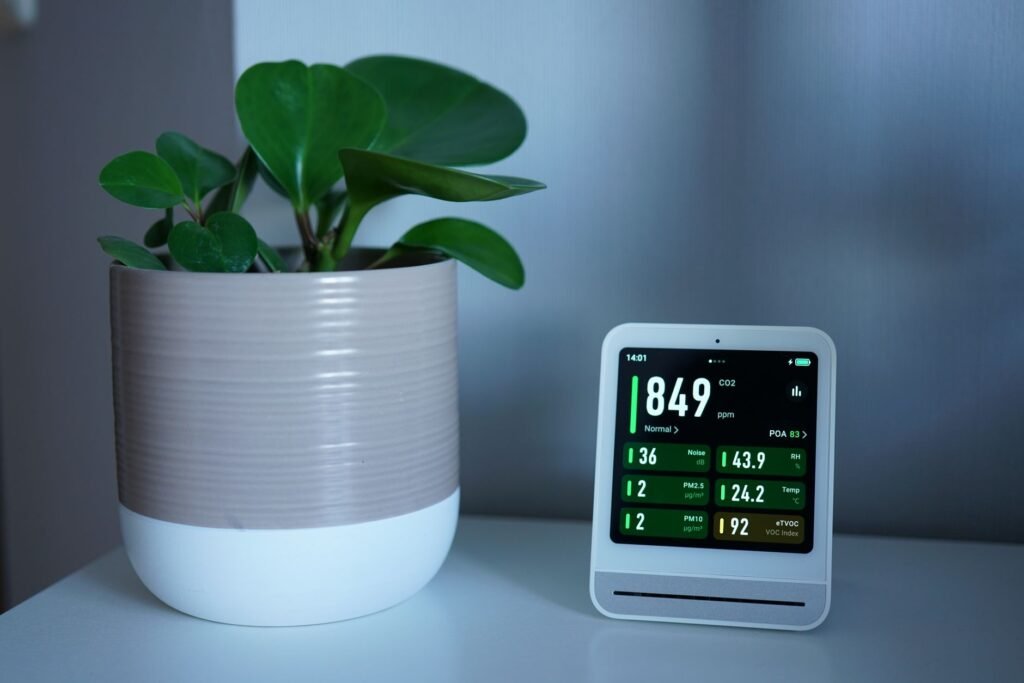
Your computer may have a limited warranty or for a laptop requiring extensive disassembly as part of the cleaning process, consult the manufacturer’s service documentation before attempting any repairs or disassembly. Dell, HP, and Lenovo have all provided guidelines for cleaning surfaces and vents – however, actual internal access procedures may differ by model.
How to verify that your fixes are actually working
Instead of making assumptions think ahead with a straightforward 14 Day Dust Audit. Taking photos on the first day will show you all three things needed for a proper audit – the intake filter, the top of the case, and a surface typically known to be dusty. Record information about how your office is set-up (window open or closed), when was the last time you clean your floors etc… To make any corrections, make only two, not six. For instance: raise your tower and change your HVAC filter.
Check your new pictures after 2 weeks of the same lights. Observe if fan noise during regular gameplay or working is quieter than before, and how clearly you can see through the filter. If you have noticed a decrease in accumulation, continue with your testing. If you have not seen any noticeable difference, then there is something in the room that was not taken out causing the increase of dust buildup in your gaming computer; this would be a reason to use higher-priced PC parts.
Bottom line
Your PC setup gathers up dust very quickly since the computer pulls in dust from everywhere in the room that was created before it was set up. The best and cheapest fixes for dust in the average home (especially combined with the DUST Score) do not involve buying additional hardware, but involve controlling the source of dust, raising the case off the floor, making it easy to take care of the computer’s intake filters, and maintaining a regular cleaning routine. Warranty step 1 (DUST Score) should also be purchased in the same sequence as steps 2-4; if this is how you happen to spend your money, you will most likely end up with a setup that remains cleaner for a longer period of time.
Is it really that bad to keep a desktop PC on carpet?
Most of the time, they do. The intake of your carpet is located near an area where dust, lint and pet hair has been disturbed. Raising your tower can also help improve the air flow around some of the lower vents and is one of the cheapest and most dependable things to improve the air flow.
Do air purifiers actually help keep a PC cleaner?
They can help, especially in smaller offices or bedrooms with pets, outdoor dust, or heavy traffic. But they work best after you fix the basics. If the tower is still on carpet beside a vent, an air purifier may help less than a $25 stand and a better room-cleaning routine.
How often should I clean PC filters and the inside of the case?
Every home is uniquely different and therefore has different needs in terms of how often its filters are changed out. Examine your filters every couple of weeks (in the beginning) to see if they are dirty enough to require cleaning. Plan on inspecting filters in the home on a quarterly basis for the most part, however if you have several of particularly dusty rooms, you may want to check that particular filter more frequently than the rest, but you do not need to tear it down completely at that time.
My setup gets a black, sticky film. Is that normal dust?
Most of the time, the answer is no. A dark sticky buildup is most likely going to be soot (the product of combustion), whether from a candle, incense, smoking material, or grease that has traveled in the air. If you have observed this at your home, focusing on how to control the source is more important than what you use to dust.
Will changing the HVAC filter help with PC dust?
This can happen if, for example, the home’s forced air system moves very large amounts of dirt particles. Keep an eye on the filter. According to ENERGY STAR, you should do a monthly filter inspection and change the filter no less than every three months or sooner if you notice it is becoming dirty. This single action will not necessarily solve all of the PC dust problems in the house, but it is a basic preventive measure in the maintenance of the whole house.
What humidity should I aim for in the room?
EPA guidance generally points to about 30% to 50% indoor humidity. Staying in that range can help overall indoor air quality, but do not expect humidity alone to stop visible dust buildup. Placement, filtration, and room sources still matter more for most PC setups.
References
- US EPA – Sources of Indoor Particulate Matter (PM)
- US EPA – Care for Your Air: A Guide to Indoor Air Quality
- US EPA – Biological Contaminants and Indoor Air Quality
- US EPA – Guide to Air Cleaners in the Home
- US EPA – What is a HEPA filter?
- ENERGY STAR – Heat & Cool Efficiently
- HP Support – Reduce heat inside the computer to prevent overheating
- Dell Support – How to Troubleshoot Fan Issues
- Lenovo Support – Keeping your computer clean