
That sudden muffled sound? That's not a broken headset. At least it's not always a broken headset. With traditional Bluetooth, Windows can set a different connection to a lower fidelity mono hands-free connection. It allows Windows to hear what you say as well as make game or music audio sound very muffled. Setups with Windows 11 LE Audio can set stereo connections with microphone audio, so muffling game or music audio is not a hard limit of all Bluetooth connections.
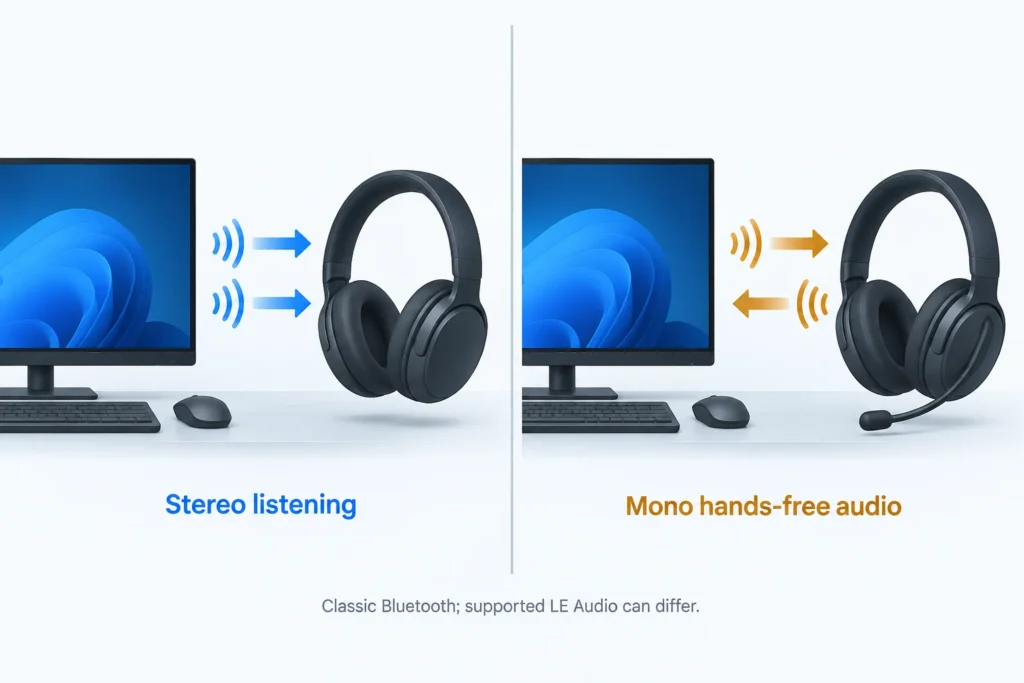
In the meantime, I'm leaving the shopping tab closed. First, check which microphone is being used in your call or game. Playback with that microphone active and inactive and see if there is a change in fidelity. The timing of the change is more useful than the price of the headset.
The microphone changes the connection’s job
In traditional Bluetooth, the arrangements are split up. A2DP is used for playback, while HFP is used for hands-free connection. Windows can set either connection as needed. This is not your music being turned down. The playback format is altered to encode voice connection.
Picture me, in an imagined example, joining a game lobby with a perfectly good playlist running. The music turns thin, and I reach for the headset box to check the return deadline. Then I notice the game selected the headset microphone instead of my desk mic. I leave the box alone and change the input first. That’s a more useful starting point than shopping while annoyed.
The trigger is opening the microphone, not necessarily speaking. There are apps that mute, but leave the microphone open. Window’s 10 unifies Classic Bluetooth endpoints, so device names may appear unchanged while their operating modes change. Windows 11 has simplified the 10 endpoints, again, device names may appear the same while their modes change.
Listen to the same sample with three microphone states
Keep your headphones, playback sample, and volume the same. I would use a piece of music that you’re familiar with rather than a match. During a match, too many things change at once. In a familiar piece, note the following states in order:
- Sounds of the environment, voice chat, microphone tests, and browser tabs using the microphone. Close the calling application if needed. Play the sample and note if the sounds of the environment come back.
- Open the app and select the Bluetooth headset microphone. In Discord, go to User Settings > Voice & Video to change input and output devices. Conduct a microphone test or join a call to hear the change.
- Select a Laptop microphone, Webcam microphone, or USB microphone as the input device, leaving headphones as the output device. End the microphone test or call and reopen to release the previous microphone. Check if the alternate microphone is usable by playing back a short sample of your voice.
If modifying the defaults in Windows doesn’t make a difference, check the app before drivers. Settings > System > Sound > Input shows the default Windows microphone settings. Apps can override these. Windows’ microphone test shows the input selection, and plays back audio if the microphone is not active. Stop the test to hear the input.
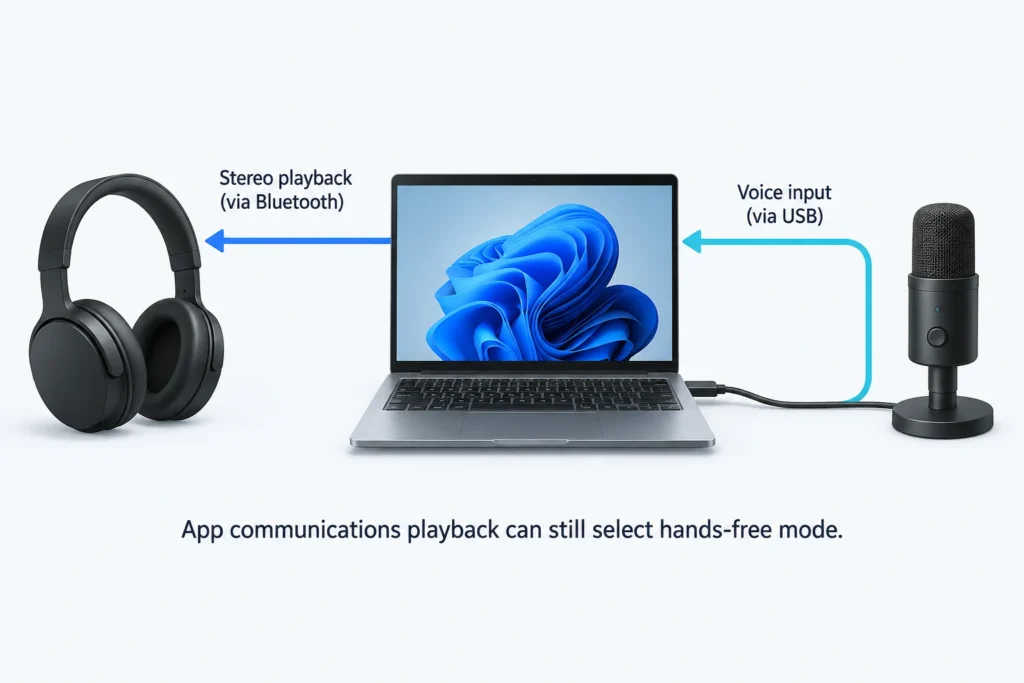
If your playback is worse with headset capture and improves when capture is closed, it’s probably hands-free switching. I’d be careful with the reverse. Windows 11 has a Communications playback stream which can set hands-free, even without the headset mic. If your microphone doesn’t restore stereo, it doesn’t always mean your headset is bad.
LE Audio can help, but check both Windows controls
Toggling LE Audio is encouraging, but doesn’t fully address your problem. Windows 11, 22H2 or later, compatible hardware, manufacturer-provided Bluetooth audio and radio drivers are required. It’s not supported on Windows 10 or 11, 21H2. Look for “Use LE Audio when available” in Settings > Bluetooth & devices > Devices to change the setting. The lack of a toggle doesn’t mean your PC can never support it.
Going stereo while the mic is on requires more of the system. Microsoft states that Windows 11 24H2 or later, build 26100.4484 or later, factory-integrated Bluetooth, compatible manufacturer drivers, and an LE Audio accessory are required. To check your build, type “winver” in the Start menu. I don’t suggest buying an adapter just because it has the Bluetooth version you’re looking for; that label doesn’t necessarily mean it’s capable of that. And Windows updating can’t make hardware that’s not there, be there.
With your headset connected, go to Settings > System > Sound > Output, and look for “Format when mic is active,” and ensure that there is a stereo option. This is the setting that solves your problem. If this is causing a glitch, try going to Settings > Ease of Access > Audio > Audio Device Settings, and ensure Mono is unchecked. Keeping two channels of playback is useful, but it doesn’t necessarily mean that both channels have identical fidelity and latency.
What another mic, dongle, or cable actually changes
| Arrangement | What changes | What to check |
|---|---|---|
| Bluetooth headphones + separate microphone | Moves microphone capture off the headset’s classic Bluetooth connection. | Test your actual app; Communications-category playback can still select hands-free mode. |
| USB Bluetooth adapter | Changes the PC’s Bluetooth hardware or integration, not necessarily the audio transport. | Check explicit support for the required mode. Jabra Link 390, for example, lists classic A2DP and HFP. |
| Headset-specific wireless USB transceiver | May use a separate wireless transport, such as a proprietary 2.4 GHz connection. | Check simultaneous playback/microphone support and PC mode for that headset and transceiver. |
| Analog cable or USB wired audio | Can bypass the Bluetooth audio path if the headset supports audio over that connection. | Check whether the built-in microphone works in that wired mode; a USB port may not provide wired audio. |
This is where I’d suggest giving the exact model vs a generic “USB” or “wired” model. The INZONE H9 II has a 2.4Ghz USB dongle and has a device-mode switch and conditions for mic recognition. That’s not like a standard Bluetooth adapter. And Sony’s WH-1000XM5 cable instructions disable Bluetooth and route phone calls through the phone’s microphone, not the headset’s built-in mic. Keeping the cable plugged in and playing solves the listening issue, but leaving the cable plugged in gives you no mic.
Consider using a microphone you own first. Treat disabling hands-free as a trade-off. You lose the path that causes the unwanted voice interaction and the microphone on the headset. You haven’t preserved both functionalities by disabling the hands-free feature.
When the quality change points beyond a profile limit
Repeating the switch associated with the microphone gives you little reason to blame the speakers, but it doesn’t prove the entire headset is OK. If sound quality remains bad after you close all capturing and communication applications, disconnect and reconnect the headset and listen without opening a call. Try a different playback application, and if supported, a different connection mode.
If sound quality is better on a phone, this is useful information. It doesn’t necessarily mean the phone has a better connection. There are a number of other components that could cause the problem. I don't have any of your hardware to test.
If an alternate microphone improves sound quality and gives you better call/chat audio, use it. If you must use the headset mic, look for LE Audio support, or wired/wireless support that keeps both the speakers and the mic together. I don’t think it is worth spending more money for a headset with the same constraint as a classic Bluetooth headset.
Sources and references
- Microsoft: Bluetooth Classic audio
- Microsoft: Check if a Windows 11 device supports Bluetooth Low Energy Audio
- Microsoft: Configuring Bluetooth LE Audio quality settings on Windows 11
- Discord: Discord Voice, Video, & Streaming Guide (2025-11-18)
- Microsoft: How to set up and test microphones in Windows
- Sony: WH-1000XM5 / WH-1000XM5SA: Using the supplied headphone cable
- Sony: INZONE H9 II: Connecting via the USB transceiver
- Jabra: Jabra Link 390 technical specifications